
The deal nobody touched. A sales pipeline run by a process
A deal stage in a CRM tells you where the sale is, but not how long it has been sitting there. How a pipeline built on a process in Opero enforces the next step, time in stage and the path from deal to offer.
 Konrad Jarosiński · Tech Lead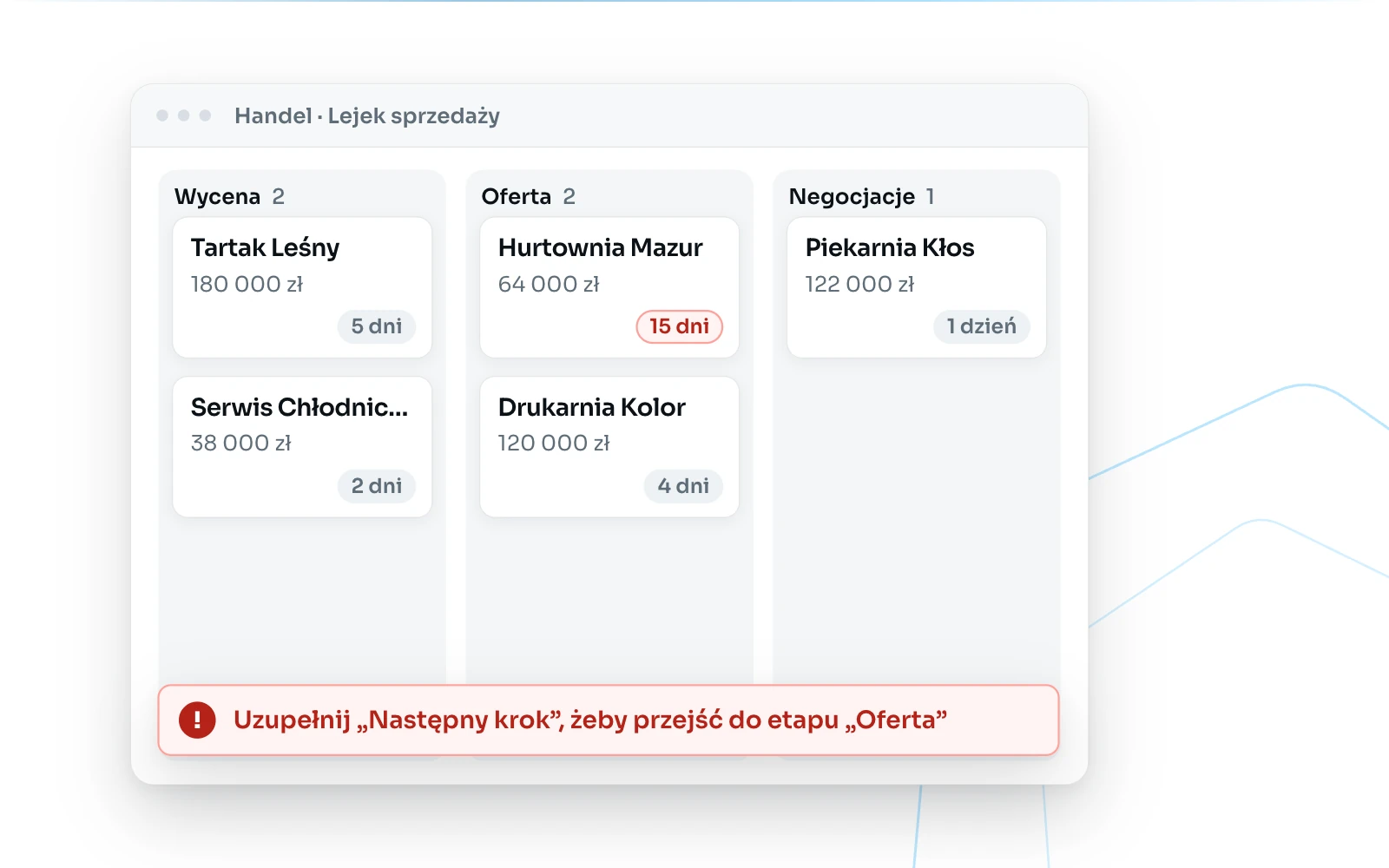
Updated 21 September 2026
In most companies the sales pipeline is a list of deals with a stage: qualification, offer, negotiation, won or lost. The account owner changes the stage, and the pipeline report shows how many deals, of what value, sit in each stage.
That report is missing one piece of information: how long a deal has been in its current stage. A deal in the “Offer” stage may have been waiting for the client’s decision for two days or for two months, and in the report it looks the same. The difference shows up in the end-of-quarter forecast, when it is too late to recover the deal.
Why deals stall
Deals are rarely abandoned on purpose. They stall because after the offer went out nobody agreed who makes the next move and when, and the reminder depends on the salesperson’s calendar. A stage in a CRM run as a list of values does not change by itself and gives no warning that it is not changing. The pipeline therefore shows the state as of the last update, not the actual state.
A deal as an object with a process
In Opero a sales opportunity is defined as a custom object with the fields the company needs: account owner, estimated value, probability, planned close date, next step. A process is attached to the object, in which the pipeline stages are process stages and a stage change is a transition. A transition can only follow paths defined in the process design, and it stays in the deal history together with the person who performed it and the date.
The next step as a transition condition
Each transition has its conditions. In a pipeline the simplest and most effective condition concerns the “Next step” field: the deal cannot move to the next stage until that field is filled in. A salesperson moving a deal to the “Offer” stage records what happens next, for example the date of the call about the offer. Information that used to live in one person’s memory becomes part of the record.
Time in stage visible on the card
A rule triggered by a process transition records the date of the last stage change. That date gives the number of days the deal has been in its current stage, shown on the deal card and on the pipeline kanban board.
A second rule, triggered on a schedule, checks deals that have exceeded the number of days in stage set by the company and sends the account owner a notification. The threshold is set separately for each stage, because three days without movement in qualification mean something different from three days waiting for the client’s board to decide.
From deal to offer without retyping
In this setup the quote, the offer and the contract are separate objects linked to the deal. A rule with a create-record step creates a quote using the counterparty data and sales scope recorded in the deal, and the offer is created from the approved quote. Client data is entered once, and from the deal you can see which quote, offer and contract belong to it.
Weighted value instead of a sum of estimates
The sum of estimated values of all deals describes the team’s ambitions, not expected sales. Weighted value, the estimated value multiplied by probability, gives a pipeline report in which a deal with a ten percent probability does not weigh as much as a deal close to signature. The sales report and dashboard are built from the same records the salespeople work on, with no export to a spreadsheet.
What a process will not do
A transition condition forces a next step to be entered, but not its quality. An entry such as “contact the client” formally meets the condition and adds nothing. A notification about a deal that has been stuck for two weeks will reach the account owner, but it will not make the call for them.
The process shows the sales manager where the pipeline is stuck and since when. The decision about what to do with it stays with people.
Where to start
With two elements: a required “Next step” field on the transition to the offer stage and a reminder about a deal that has exceeded the days-in-stage threshold. Both are set up in the process design and in rules, without a developer. Once they are in place, the pipeline stops being a snapshot from the day of the last update. We cover how Opero moves a case through stages in more detail in “A process instead of a status field”.
Tags
Related reading
- An off-the-shelf system, or a platform to build your ownBoth options carry a real price and both are sometimes right. The honest case for and against each, three questions that settle it, and a middle road nobody talks about.
- The spreadsheet as a company register: how to tell it has stopped workingA spreadsheet is not a bad tool. It is an invisible one, as far as the rest of the company is concerned. Seven signs it has turned from a tool into a risk, and one first step that is not a major implementation.
- A process instead of a status field. How Opero moves a case through stagesA stage stored as a field value can be changed by anyone with access to the record. How Opero enforces order, permissions and deadlines, shown on a cost invoice workflow.
About the author
Konrad Jarosiński
Tech Lead
Inżynier i architekt z 15 letnim doświadczeniem.
Next step
See how this works on your own processes.
We can walk through your operations, show how Opero would model them, and be direct about what fits and what does not.