
Document templates. Protocols and contracts from data already in the system
Most errors in company documents come from copying the previous file. How document templates work in Opero: variables, shared parts, versions and documents generated by rules.
 Konrad Jarosiński · Tech Lead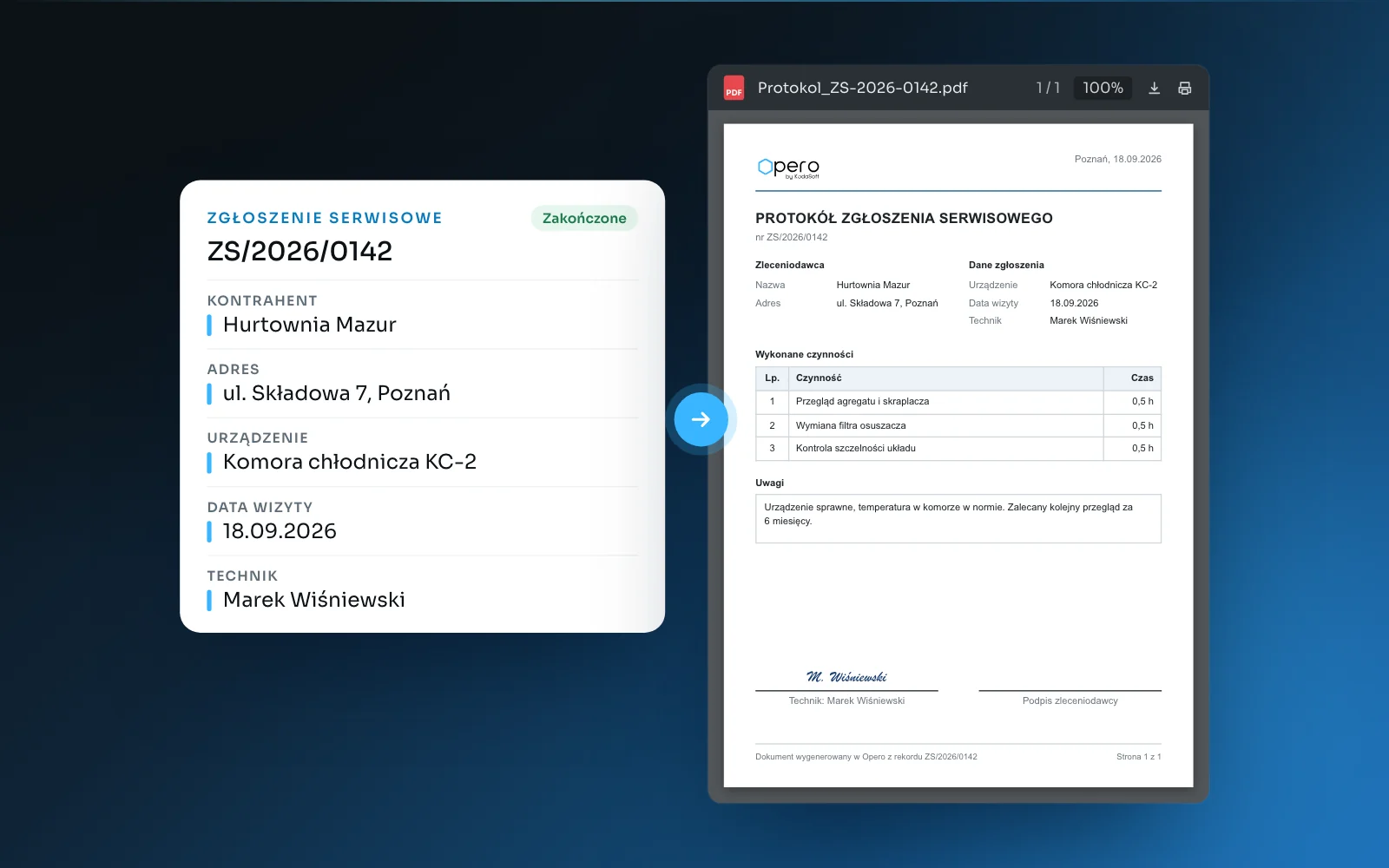
Updated 21 September 2026
In many companies a contract for a new client is produced the same way: open the file from the previous contract, swap the client name, address and number, and save it under a new name. Most errors in company documents do not come from carelessness but from this method. The previous file leaves behind an old bank account number, another client's equipment or a clause from before the terms changed.
The data a document needs is usually already in the system: the client, the address, the order number, the deadline, the person responsible. Retyping it into a word processor creates a second copy that lives a life of its own from that moment on.
Where document errors come from
The previous document as the template. Every replaced value is a place where something can be missed.
Several versions of the template on a shared drive. “Contract_template_final” and “Contract_template_new” differ by one clause that only one person knows about.
Data in two places. A client address corrected in the system does not change the address in a document someone typed by hand.
A header and footer in every file separately. A change of registered address means correcting every template one by one.
A template: page layout plus variables
A document template in Opero is a page design: text, tables, a logo, a QR code and a signature field. Wherever data belongs, variables stand in place of values and point to specific information, such as the client name, the request number or the visit date.
A table in the template can be fed from a list of data. Order lines, completed tasks or parts used appear in the document with as many rows as have been recorded, with nothing added by hand.
The document is generated from the record's data with a single click. The protocol then contains what is in the request, not what someone retyped.
Shared parts: one header and footer for everything
The header with the logo and company details and the footer with registration data are separate shared parts attached to templates. A new address, bank account number or logo is changed in one place and applies to every template that uses that part.
Versions: the template changes in a controlled way
A template has a draft version and a published version. Documents are produced only from the published version, so a change to the template does not reach a client until someone approves it by publishing. An earlier version can be restored.
Each document type can have a default template. Nobody has to guess which of several similar templates is the current one.
A document generated by a rule
A document does not have to wait for a click. The rules engine can generate it automatically, for example when a service request moves to the “Completed” stage. The protocol is then created as the case closes, not whenever someone remembers it.
Invoices in the same editor, KSeF separately
Templates serve the documents of the company that works in Opero: an order, a protocol, a contract, an offer, and also a sales invoice and a cost invoice. The layout of an invoice is set in the same editor as the layout of a protocol or a letter.
Documents from KSeF, Poland's national e-invoicing system, follow a separate path. The visualisation of a KSeF invoice and the PDF of the official receipt confirmation (UPO) are not document templates; they belong to the KSeF integration, where the file is produced by a step in a rule.
What a template will not fix
A template carries the record's data into the document, so an error in the record ends up in every document. Clean client data is a precondition for templates, not a side effect of introducing them.
A template does not replace work on the content either. A contract negotiated clause by clause with the other party remains a working document until the wording is agreed. Templates work where the content is fixed and the data changes: protocols, confirmations, orders, standard contracts and outgoing letters.
Where to start
Pick the one document most often produced by copying the previous file.
List the data that changes in it and check that each item has its own field in the record.
Separate the header and footer into shared parts.
Publish the template, mark it as the default for its document type and remove the old templates from the shared drive.
The last step is often the hardest. Without it, the file on the drive and the template in the system start drifting apart within the first week.
Tags
Related reading
- A client asks to change one number - a story about automations maintenanceAutomation in business systems often has a low barrier to entry. Maintaining it is another matter entirely. A few words on three patterns we met on implementations, and the design decisions that came out of them in Opero.
- The cost invoice: who describes it, who approves it, who is accountableMost companies have a written approval procedure nobody follows. Five roles around a single invoice, three typical blockages, and an approval matrix that does not carry forty exceptions.
- A process instead of a status field. How Opero moves a case through stagesA stage stored as a field value can be changed by anyone with access to the record. How Opero enforces order, permissions and deadlines, shown on a cost invoice workflow.
About the author
Konrad Jarosiński
Tech Lead
Engineer and architect with 15 years of experience.
Next step
See how this works on your own processes.
We can walk through your operations, show how Opero would model them, and be direct about what fits and what does not.