
Notifications. How do you know a deadline will pass before anyone finds out?
A date in a field notifies nobody. Opero sends three kinds of signal: a task due date on a process stage, a scheduled rule and a mention notification. Each one is triggered by something different.
 Konrad Jarosiński · Tech Lead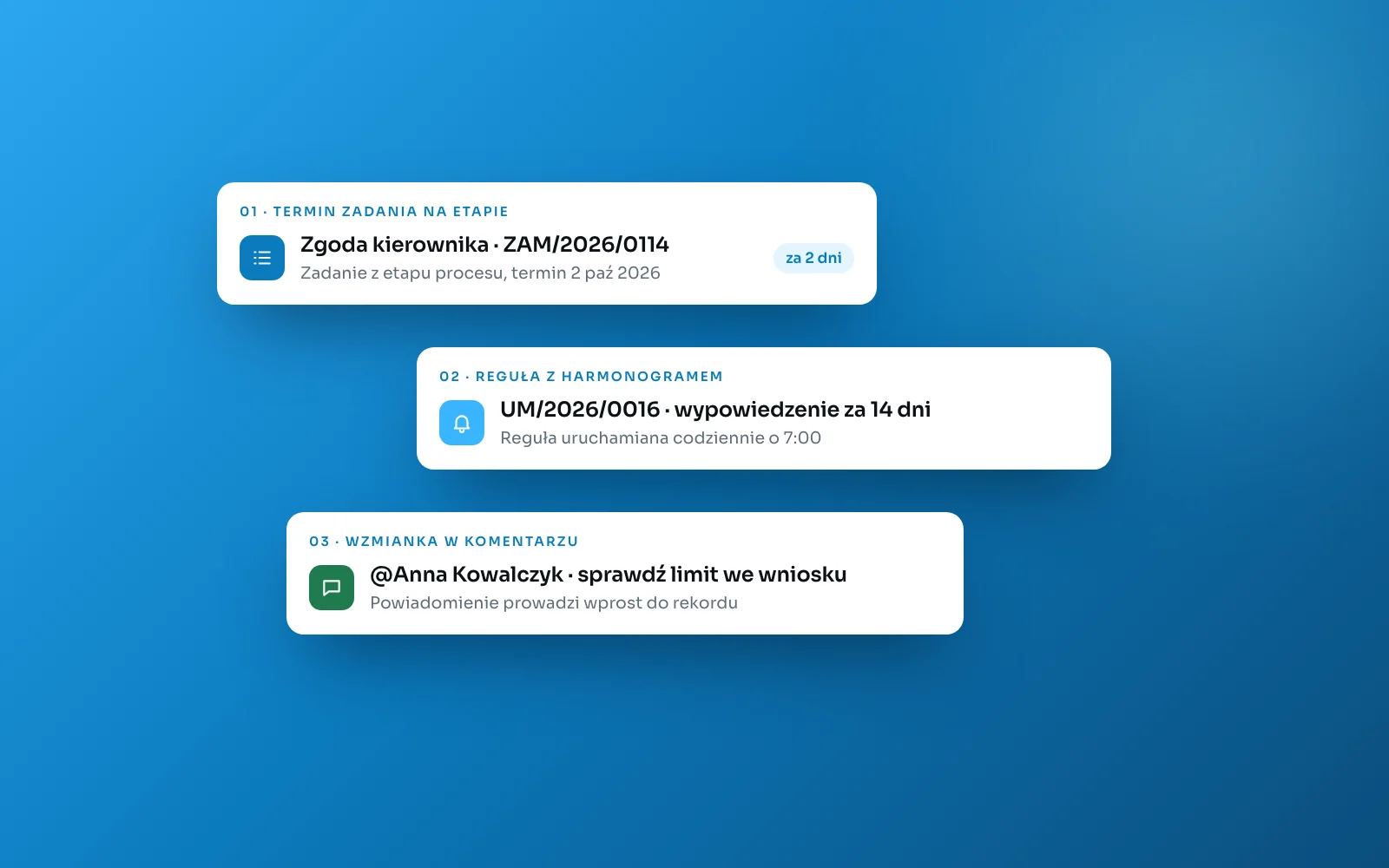
How do you know a deadline will pass before anyone finds out?
In most companies the answer is: from somebody's memory. The notice deadline of a contract is recorded in the contract register, in a date field, and there it stays. Nobody reads it until the contract renews itself automatically for another year, because nobody served notice in time. A date in a field is information. It becomes a signal only when it reaches the right person by itself and leads straight to the case it concerns.
Opero sends three kinds of such signal. What triggers them is what sets them apart, and it is worth having all three, because they watch different things.
Signal one: a task due date on a stage
The simplest signal comes out of the process. When a record enters a stage, Opero creates a task assigned to a specific person or role, and that person is notified that a task is waiting. A stage can carry a due period in calendar days, which gives the task its due date. You see tasks on the “my tasks” list and on a kanban board whose columns are the process stages.
That due date blocks nothing. It dates the task, and what should happen once it passes is set separately, with a rule.
Signal two: a scheduled rule
An approaching deadline is not an event. Nothing changes in the record, time simply passes, so the rules engine has nothing to react to. That is what the schedule trigger is for.
A rule that runs every day at a set hour fetches the records that meet a condition, for example contracts whose notice period ends within the next two weeks, and sends a notification to the person responsible for each one. The same construction lets you escalate: the first reminder goes to the person responsible, and a second rule notifies their manager once the deadline passes without a response.
The rules engine also has event triggers: a record being created or changed, a process moving into a given stage, a process completing, an attachment being added, an invoice changing. You test a rule before deploying it, so you know what will go out before anything reaches the team.
Signal three: a mention notification
The third kind does not come from configuration but from a person. When somebody mentions you in a comment on a record, you receive a notification with the author's name and an excerpt of the comment, and from it you go straight to the case. The same works in rich-text fields, so a person mentioned in the justification of a purchase request is signalled too. A notification also arrives when somebody reacts to your comment.
This path replaces the CC line. You do not add anyone to a thread and you do not forward the whole correspondence so that they understand the context, because the context is in the record.
Who receives it, and how loudly
You name recipients as individual users, as holders of a role in the organization or in a company, or as all members of the organization. Addressing by role has a practical advantage: when a team's line-up changes, notifications reach the new people without the rule being edited.
Notifications carry a severity: informational, warning or critical. A failed integration connection does not get lost among task reminders, because it is critical.
They also carry a collapse window. Repeats of the same signal merge into one, and some types have that window fixed: a notice about an overdue sales invoice will not repeat more than once a day, and an integration failure more than once an hour. A notification appears in the application and, where the notification policy allows it, as an e-mail as well. When a message has to reach someone outside the system, a rule will send an e-mail based on an organization template.
What stays with the company
A notification informs, but it does not do the work. If you have not settled who owns the contract, the rule has nobody to send the signal to, and sending it to everyone means nobody feels addressed.
The signal is also only as good as the data it runs on. A contract with no validity date entered will never appear in a reminder, so the date field should be required on the registration form. And one last thing: notifications will not set your priorities for you. When every deadline is urgent, none of them is.
Before you switch on your first rule, check four things.
The deadline whose breach has real consequences has been chosen, and it is stored in a date field rather than in notes.
Every record has a responsible person, or a role that stands in for one.
The rule has been tested on a few records before anyone received its first notification.
You know what should happen when the deadline passes despite the reminder, and who gets the signal then.
Tags
Related reading
- A client asks to change one number - a story about automations maintenanceAutomation in business systems often has a low barrier to entry. Maintaining it is another matter entirely. A few words on three patterns we met on implementations, and the design decisions that came out of them in Opero.
- The spreadsheet as a company register: how to tell it has stopped workingA spreadsheet is not a bad tool. It is an invisible one, as far as the rest of the company is concerned. Seven signs it has turned from a tool into a risk, and one first step that is not a major implementation.
- A process instead of a status field. How Opero moves a case through stagesA stage stored as a field value can be changed by anyone with access to the record. How Opero enforces order, permissions and deadlines, shown on a cost invoice workflow.
About the author
Konrad Jarosiński
Tech Lead
Inżynier i architekt z 15 letnim doświadczeniem.
Next step
See how this works on your own processes.
We can walk through your operations, show how Opero would model them, and be direct about what fits and what does not.